Multi-target Cascade Routing
Cascade routing lets you define multiple upstream targets for a single request. MirApi will try them in sequence (Priority) or simultaneously (Race), returning the first successful response.
Cascade routes are configured in your dashboard and activated with the X-Route-Key header. This approach keeps your request headers clean and allows routes to be updated without changing your code.
Configure a Route in the Dashboard
Section titled “Configure a Route in the Dashboard”Before using cascade routing, create a route in your MirApi dashboard:
- Open Routes → Create Route
- Set a name (e.g.,
ai-providers) - Add targets as a comma-separated list of full URLs:
https://api.openai.com/v1/chat/completions,https://api.anthropic.com/v1/messages,https://api.groq.com/openai/v1/chat/completions
- Select a strategy: Priority or Race
- Set per-target timeout (milliseconds)
- Optionally configure body mapping and response extraction rules
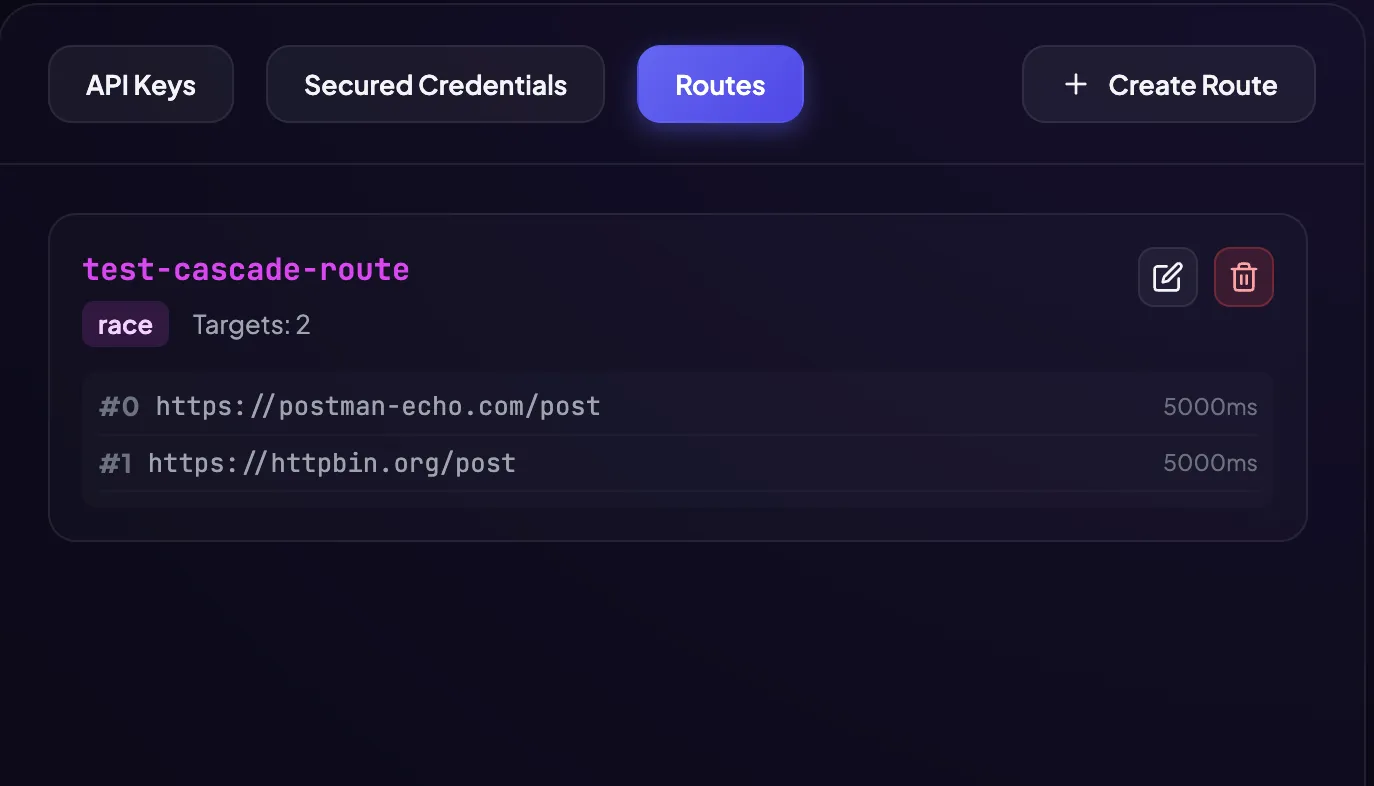
Activate a Route
Section titled “Activate a Route”curl -X POST https://proxy.mirapi.io/ \ -H "X-MirApi-Key: $MIRAPI_KEY" \ -H "X-Route-Key: ai-providers" \ -H "X-Identity-Key: Bearer $OPENAI_KEY" \ -H "Content-Type: application/json" \ -d '{"model": "gpt-4o", "messages": [{"role": "user", "content": "Hello"}]}'Cascade Strategies
Section titled “Cascade Strategies”Priority (Sequential Failover)
Section titled “Priority (Sequential Failover)”Targets are tried in order. The next target is only tried if the previous one fails (5xx, timeout, or connection error).
Target 1: https://api.openai.com/...  → fails (503)Target 2: https://api.anthropic.com/... → fails (timeout)Target 3: https://api.groq.com/...   → succeeds ✓
Response: X-Rescued: cascade_fallback
Best for:
- Saving costs (only one upstream is called per request in the happy path)
- Payment APIs where you need deterministic ordering (primary provider first)
- Any scenario where you want explicit control over which provider is tried first
# AI provider route — tries OpenAI first, then Anthropic, then Groqcurl -X POST https://proxy.mirapi.io/ \ -H "X-MirApi-Key: $MIRAPI_KEY" \ -H "X-Route-Key: ai-priority" \ -H "X-Identity-Key: Bearer $OPENAI_KEY" \ -H "Content-Type: application/json" \ -d '{"messages": [{"role": "user", "content": "What is Go?"}]}'Race (Parallel)
Section titled “Race (Parallel)”All targets are called simultaneously. The fastest successful response wins; the others are cancelled via context cancellation.
Target 1: https://api.openai.com/... → responds in 1200ms ✗ (lost)Target 2: https://api.anthropic.com/... → responds in 890ms ✗ (lost)Target 3: https://api.groq.com/... → responds in 89ms ✓ (wins)Best for:
- Ultra-low latency requirements where response time is critical
- Read-only queries (exchange rates, lookups, embeddings) where duplicate calls are acceptable
- Scenarios where all providers return equivalent responses
# Race mode — fastest provider winscurl -X POST https://proxy.mirapi.io/ \ -H "X-MirApi-Key: $MIRAPI_KEY" \ -H "X-Route-Key: ai-race" \ -H "Content-Type: application/json" \ -d '{"messages": [{"role": "user", "content": "Quick question"}]}'Combining with Other Features
Section titled “Combining with Other Features”Route + Retry
Section titled “Route + Retry”Each cascade target can be retried independently. Configure retries per request:
curl -X POST https://proxy.mirapi.io/ \ -H "X-MirApi-Key: $MIRAPI_KEY" \ -H "X-Route-Key: payment-cascade" \ -H "X-Retry-Count: 2" \ -H "X-Retry-Delay: 300ms" \ -H "X-Proxy-Timeout: 10s" \ -H "X-Attempt-Timeout: 2s" \ -H "Content-Type: application/json" \ -d '{"amount": 9900, "currency": "usd"}'# Target 1 is retried up to 2 times before trying Target 2, etc.Route + Async Webhook
Section titled “Route + Async Webhook”Run a full cascade asynchronously:
curl -X POST https://proxy.mirapi.io/ \ -H "X-MirApi-Key: $MIRAPI_KEY" \ -H "X-Route-Key: payment-cascade" \ -H "X-Webhook-Callback: https://your-app.com/payments/done" \ -H "X-Proxy-Idempotency-Key: order_789_pay_1" \ -H "Content-Type: application/json" \ -d '{"amount": 9900, "currency": "usd"}'# Returns 202 immediately# Worker runs full cascade (priority or race) in background# POSTs first successful response to your callbackRoute + Smart Cache
Section titled “Route + Smart Cache”If all cascade targets fail, serve from cache:
curl https://proxy.mirapi.io/ \ -H "X-MirApi-Key: $MIRAPI_KEY" \ -H "X-Route-Key: exchange-rates-cascade" \ -H "X-Smart-Cache: 300s"# Tries all targets in the route# All fail → serves cache → X-Rescued: cacheRoute Target Authorization (Route Target Auth)
Section titled “Route Target Authorization (Route Target Auth)”Cascade routing allows you to configure unique authorization settings for each separate upstream service (target_url) within a single route.
Why is this important?
Section titled “Why is this important?”Previously, when forwarding a request along a cascade (e.g., Stripe ➔ Adyen ➔ Custom Bank), the proxy attempted to use a single shared authorization header for all services. This limited the utility of cascades, as different payment gateways and APIs require different formats of authentication.
Now, you can securely bind each service in the cascade to its own credentials from the database, specifying a custom HTTP header name and key interpolation template for each target.
How to Configure (Example)
Section titled “How to Configure (Example)”Imagine a cascade route payment-cascade. If the primary gateway (Stripe) returns an error, the request is automatically routed to the backup gateway (Custom Bank API). Each has its own authorization format.
Here is an example JSON payload to create or update this route:
{ "route_key": "payment-cascade", "strategy": "priority", "targets": [ { "priority": 1, "target_url": "https://api.stripe.com/v1/charges", "timeout_ms": 10000, "credential_id": "9b1deb4d-3b7d-4bad-9bdd-2b0d7b3dcb6d", "auth_header": "Authorization", "auth_template": "Bearer {{secret}}" }, { "priority": 2, "target_url": "https://api.custombank.com/v1/payments", "timeout_ms": 15000, "credential_id": "c3098522-8356-4c91-9e2c-29ad9c42c943", "auth_header": "X-Bank-Token", "auth_template": "{{secret}}" } ]}Parameter Details:
Section titled “Parameter Details:”credential_id(optional): The UUID of the encrypted credentials in your Credentials vault. If omitted or left empty (null/""), the request to this target is sent without authorization (or with the client’s original headers).auth_header(default:Authorization): The name of the HTTP header where the proxy will insert the key.auth_template(default:Bearer {{secret}}): The formatting template. The proxy will automatically decrypt the token using yourX-Proxy-Master-Keyand replace the{{secret}}placeholder with the real decrypted key.
Edge-Level Security
Section titled “Edge-Level Security”All credentials (credential_id) are stored in the database encrypted using the AES-GCM algorithm. Decryption occurs strictly in-memory at request execution time using the X-Proxy-Master-Key passed by the client in the request headers. Decryption keys are never stored on our disks.
Target Request Body Mapping
Section titled “Target Request Body Mapping”Request body mapping parses the client’s incoming JSON body, renames keys, traverses nested fields and arrays, and restructures the payload before forwarding it to the upstream. Renamed source keys are automatically removed from the output.
The mapping rule format is a comma-separated list of rules: source_path=>target_path or source_path=>target_path(template).
Supported Path Syntax
Section titled “Supported Path Syntax”| Feature | Example | Description |
|---|---|---|
| Flat key rename | amount=>sum | Renames a top-level key |
| Nested object (dot-notation) | data.order=>data.order_id | Renames order to order_id inside the data object |
Array traversal with [] | data.orders[].order=>data.orders[].order_id | Renames order to order_id for every item in the orders array |
Array traversal without [] | data.orders.order=>data.orders.order_id | Same as above — brackets are optional; auto-detected |
| Value template | order=>order_text(Order ID: #{value}) | Formats the field value inside a custom string |
| Cross-field template | status=>status(Order {order} status is {value}) | Interpolates other field values into the template |
How it works:
Section titled “How it works:”- Your client sends the request to the proxy gateway with the original JSON structure.
- The gateway intercepts the body and, before forwarding it to a target, renames and transforms keys as configured in that target’s
body_maprule. - Nested paths and array items are traversed automatically. The rest of the payload keys remain untouched.
A. Flat Key Renaming:
// body_map: "amount=>sum, currency=>cur"// Input: {"amount": 100, "currency": "USD"}// Output: {"sum": 100, "cur": "USD"}B. Nested Objects Mapping:
// body_map: "data.order=>data.order_id"// Input: {"action": "get_status", "data": {"order": 353454876}}// Output: {"action": "get_status", "data": {"order_id": 353454876}}C. Array Traversal:
// body_map: "data.orders[].order=>data.orders[].order_id"// or "data.orders.order=>data.orders.order_id"// Input: {"data": {"orders": [{"order": 101}, {"order": 102}]}}// Output: {"data": {"orders": [{"order_id": 101}, {"order_id": 102}]}}D. Dynamic Value Template {value}:
Formats the mapped field’s value inside a custom text string. Use {value} as a placeholder for the source field value:
// body_map: "order=>order_text(Order ID: #{value})"// Input: {"order": 101}// Output: {"order_text": "Order ID: #101"}E. Cross-Field Reference Template {field_name}:
Interpolates values of other fields from the same JSON context. Looks up fields in the current object first, then falls back to the global root:
// body_map: "status=>status(Order {order} status is {value})"// Input: {"order": 101, "status": "success"}// Output: {"order": 101, "status": "Order 101 status is success"}F. Sibling Field Reference in Arrays:
Accesses sibling keys within each individual array element during iteration:
// body_map: "data.orders.status=>data.orders.status_text(Order {order} is {value})"// Input: {"data": {"orders": [{"order": 101, "status": "success"}, {"order": 102, "status": "fail"}]}}// Output: {"data": {"orders": [{"order": 101, "status_text": "Order 101 is success"}, {"order": 102, "status_text": "Order 102 is fail"}]}}
---
## Custom Body Fallback Conditions
By default, cascade routing triggers the next fallback only when a target endpoint returns a `5xx` status code, times out, or experiences connection errors.
However, many APIs (particularly payment gateways) return a `200 OK` status even when a transaction is declined or fails. To support routing on business logic failures, each route target can define a custom fallback condition in the dashboard/database using two parameters:- `fallback_field`: A JSONPath expression pointing to the field in the response JSON to check. The `$.` prefix is **optional** — it is prepended automatically if omitted. Supports nested objects (dot-notation) and array elements (`[]` notation).- `fallback_value`: A string value to match (case-insensitive substring check).
### Supported `fallback_field` Syntax
| Example | Equivalent to | Description ||---|---|---|| `status` | `$.status` | Top-level field || `error.code` | `$.error.code` | Nested object field || `errors[].code` | `$.errors[*].code` | Field inside any element of an array |
### How it works:1. The target endpoint responds with a successful status code (less than `500`).2. The gateway reads the response body and extracts the value at `fallback_field` using JSONPath.3. If the extracted value contains the `fallback_value` as a substring, the gateway treats the response as a **failure**.4. The gateway discards the response, logs the fallback trigger, and immediately falls back to the next target in the cascade chain.

### Example: Payment Declined FallbackAn upstream payment processor returns `200 OK` but declined the payment:```json{ "transaction_id": "tx_abc123", "status": "declined", "failure_reason": "insufficient_funds"}By configuring the target with:
- Fallback Field:
status(or$.status) - Fallback Value:
declined
The gateway intercepts the 200 OK, sees that $.status equals "declined", treats it as a failure, and routes the payment request to the next backup bank target in your cascade.
Example: Array Error Code Fallback
Section titled “Example: Array Error Code Fallback”An upstream returns errors as an array:
{ "errors": [{"code": "card_declined", "message": "Insufficient funds"}]}By configuring the target with:
- Fallback Field:
errors[].code - Fallback Value:
card_declined
The gateway checks the code field of every element in the errors array and triggers a fallback if any of them match.
Anti-Loop Protection
Section titled “Anti-Loop Protection”The gateway validates all target URLs against its own IP addresses and hostnames. Any target URL that resolves to the proxy itself is rejected with 400 Bad Request to prevent infinite request loops.
Response Headers for Cascade
Section titled “Response Headers for Cascade”When a non-primary target is used, the response includes:
HTTP/1.1 200 OKX-Rescued: cascade_fallbackIf the primary target (first in the list) succeeds, no X-Rescued header is added.